
As anyone who knows me will attest I spend a lot of time in Google’s productivity suite, Google Workspace. I have used Workspace (previously G Suite, previously Google Apps for Education) for a long time now. In fact I was even an early user of Writely, the online collaborative writing tool that Google acquired back in 2006 that formed the basis of what later became Google Docs. I currently use Docs on an almost daily basis and have used it as my primary word processing tool for well over 10 years.
However, prior to spending a lot of time living in Google land, I did (probably much like everyone else on the planet) use Microsoft Word a lot. As personal computers became a thing in the 90s, Microsoft’s Word and Corel’s Wordperfect battled it out for supremacy, with Word eventually emerging as the closest thing to a “standard” in the world of word processing. Back then I spent a lot of time in Word, and I think I could claim to be fairly proficient with it.
Of course there are many word processing alternatives outside of Microsoft and Google, and I encourage people to explore them.
However, I started to wonder how Google Docs and Microsoft Word stack up against each other these days, so I decided to spend a little time exploring both in a head to head comparison. I mentioned it on Twitter and several people said they would be keen to know what I thought, so read on to find out.
First of all, before we get started, remember that Google Docs is only available as an online web based tool, so I want to make it clear that I am comparing Google Docs to the equivalent web based version of Microsoft Word, called Word Online. I realise the full desktop version of Microsoft Word has a lot of extra bells and whistles (sometimes to the point of making it feel a little unwieldy to me) and the online version is a more simplified version of desktop Word. However, the real reason I am focusing on the online version of Word is because, as one of the many millions of people around the world using a Chromebook, the online version of Word is the only one I have access to, since desktop Word cannot be installed on a Chromebook. I’m not alone there… in the second half of 2021 ChromeOS became the most commonly used computer operating system in education globally, and that’s a trend I only see continuing. Basically, for millions of education users, if it doesn’t work in a browser, it doesn’t work .
Secondly, both Google Docs and Word Online are free to use, but also offer a paid tier for users who want more features and are willing to pay a little more for them. For Google Docs, there are additonal features available to users of Workspace Plus, the paid edition of Workspace. And for Word Online there are additional features available to users who pay extra for the Premium version. For this comparison, I’ll be comparing only the free edition versions of both.
Thirdly, I’m going to try really hard to remain unbiased in my assessment of these two tools. I’ve used both although I obviously have my own preferences. But I’ll try to remain as neutral as I can. There are many instances where both tools can do exactly the same thing in essentially the same way, and which way you prefer or which final result looks better may be just a matter of personal preference. If you think I’m being biased or missing something important, feel free to call me out in the comments.
Right, lets get into it.
I’m running these comparisons on a 14″ HP C640 Chromebook with 8GB RAM, attached to a 27″ 4K external monitor. I am writing on the Chromebook’s main screen and I have both Docs and Word open in two windows side by side on the external monitor. This means that both are using the same system resources, internet connection, etc.
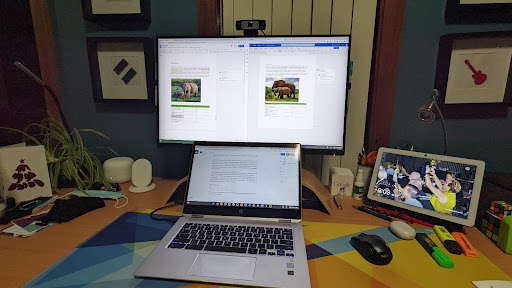
As I compare one feature to another I am literally trying to achieve the same task in each windows using both Docs and Word. Where the same feature exists in both, I’ll perform the same task in as similar a way as I can. If you have never tried to do this before may I suggest you try it. Comparing different tools side by side like this, trying to do the same things, is a great way to compare them. Naturally, you’ll need a Google account for Docs and a Microsoft account for Word. I’ve heard it’s possible to authenticate into either with just one account although I don’t know much about that and have not tried it.
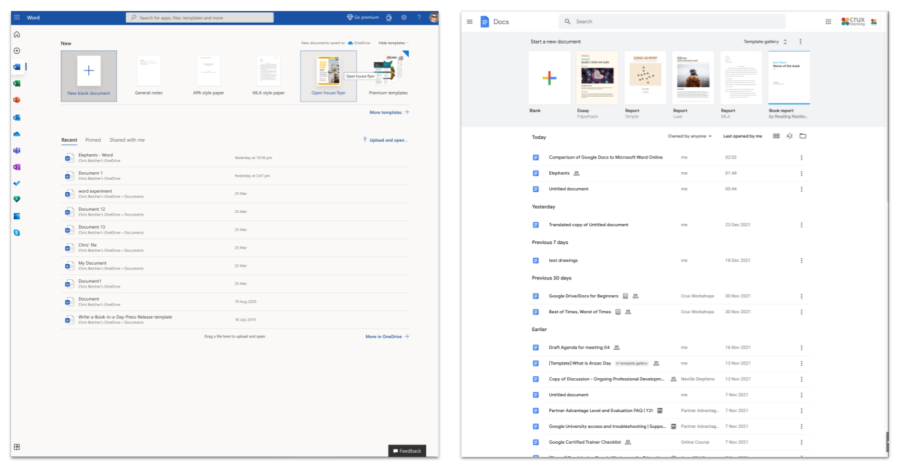
Both tools have a very similar relationship to their online storage. Word Online uses OneDrive and Google Docs uses Google Drive, and each have a specific UI just for their word processors with docs.google.com and office.com/launch/word. Both present a very similar interface and if you’re used to using one, then adapting to the other should be pretty straightforward. As well as a list of your online files, they both offer a selection of templates to choose from. Microsoft is the clear winner in the breadth of their template collections, although it takes a few clicks to drill down into the full collection (there are also many more for premium subscribers) whereas Docs needs only one click to see the full collection, but they both offer a good range of templates across a range of categories. One nice extra that Docs offers is the ability to have domain templates, so if your school or business has specific custom templates they require, these can be presented in a separate domain level collection.
As I begin to compare both Word and Docs, my overwhelming first impression is that both tools have an enormous amount of overlap in both what they can do and how they do it. They have a lot in common and if you know one, then adapting to the other should not be too difficult. Working my way through the menus, it appears that there is very little that one has that the other does not, and all the usual word processing features you’d expect are all there. I expect the devil to be in the details.
The File menu for both has the usual things – Make a new file, open an existing file, make a copy of an existing file (called Save As in Word and Make a Copy in Docs), as well as the ability to export to different formats, print, and share. One difference is that Word can Save As to PDF and ODT formats, and export to PowerPoint. Docs can Download into Word, ODT, RTF, PDF, TXT, HTML and EPUB, so perhaps more versatile if you are looking to change the format of your file.
The File menu in Docs offers features that can also be found in Word, although Word places some of them under different menus. One unique feature that Docs does offer here is the ability to Publish to the Web. It is something I do use fairly often, and I can’t find an equivalent feature in Word.
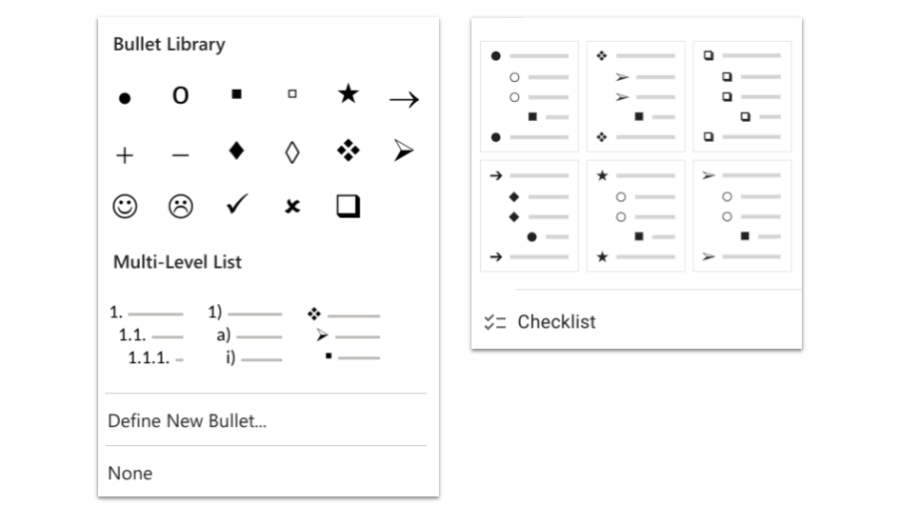
Moving across some of the other menus, both tools offer the ability to do all the usual things you’d expect in terms of text editing – cut, copy, paste, undo, redo, bold, italic, underline, strikethrough, text and highlight colouring, a variety of different bullet types, indenting, spacing and so on. They both have expected features like Table of Contents, Version History, Word Count, Rulers, Navigation/Document Outline, etc. It’s all there. Word has the edge when it comes to the different types of bullet icons it offers, with diamonds and stars and arrows and even smiley faces, although Docs does offer a few different varieties as well. Where I think Docs might have an edge here is with the new checklist bullets, which allow you to create interactive checklists which can be ticked and automatically put a strikethrough the associated bullet item. It’s a nice touch made possible thanks to the new underlying canvas technology in Docs. More on that later.
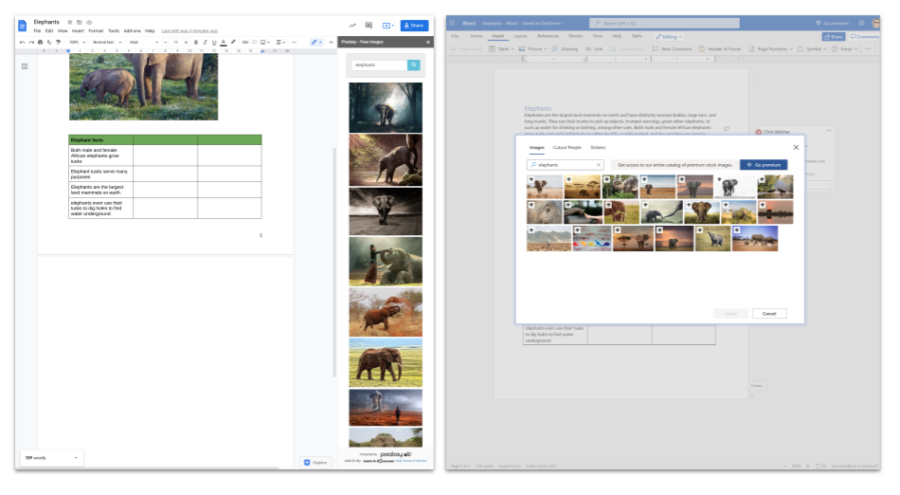
Both tools support the insertion of images from the web, with Word relying on Bing search and Docs obviously using Google search. Which you prefer is up to you. Both return copyright free, creative commons images. Beyond images from the web, there are some important differences though. Word offers the ability to insert images from your local drive (aka This Device), OneDrive, Stock Images or Bing. Docs provides more options by allowing images to be inserted from your local drive (aka Upload from Computer), the web, Google Drive, Google Photos, by URL and from the camera. That camera option is a big deal. I’ve found that being able to easily snap an image using your computer’s webcam and add it directly into the document is a huge timesaver in classrooms. I’m surprised Word is missing it.
The Insert Stock Images option in Word is interesting as it provides access to a large collection of professionally shot photos ready to insert into your document. To access the full collection of images requires a premium plan, so I’m not sure exactly how many you get with the free plan. To be honest, I’ve never really been disappointed with the images that turn up from a regular Google image search, but it’s nice that Microsoft offers this feature. For Docs users looking for a similar thing, the best option would be an AddOn from Pixabay or UnSplash images, which offer amazing free stock images, although of course as an AddOn it would be subject to your organisation’s policy on third party tools.
This would also be a good time to point out that the Google way of surfacing most of these user interactions is via a narrow panel on the right hand side of the screen, whereas Microsoft tend to use a floating window right in the middle of the screen. Personally I prefer the Google approach here as it doesn’t block my view of the document at all, but both work ok and it’s really just a matter of personal preference.
I created a document with each tool and did the following tasks…
- Added a block of text
- Added a heading and used the Heading 1 style to format it
- Inserted a picture from the web
- Inserted a 3 x 4 table and added some content
- Added a page number
- Added a comment to a text selection
- Added a comment with an @reply to flag a specific person
This is a fairly simple list of basic tasks, but a few things struck me. First, both tools had no trouble doing these basic tasks and obviously all the necessary tools are present. In this regard there’s not much difference. That said, I prefered the way Docs felt less cluttered. There was some spacing included between the Heading and the body text, there was some padding around the table cell content, and the default text for Docs felt less cramped to me. Docs defaults to Arial 11 and Word to Calibri 11. Despite being the same point size, Calibri looks smaller and felt a little crowded to me. I realise that all of these settings can be changed, but with the defaults this was my first impression. Again, maybe I’m just used to the less cramped feel of Docs, so you may completely disagree with me here.
Let’s talk about fonts for a moment. I think this is arguably a win for Google Docs. Being web based, both systems use webfonts rather than locally installed fonts. The list of available fonts in Word Online offers only 21 different typefaces to choose from, and many of these look quite similar. I cannot find any obvious way to extend or customise this list. It seems you are stuck with these 21 fonts, at least on a Chromebook.
On the other hand, Docs has enormous fexibility with font selection, and can tap into the entire collection of Google Fonts (currently around 1000 typefaces with more on the way).
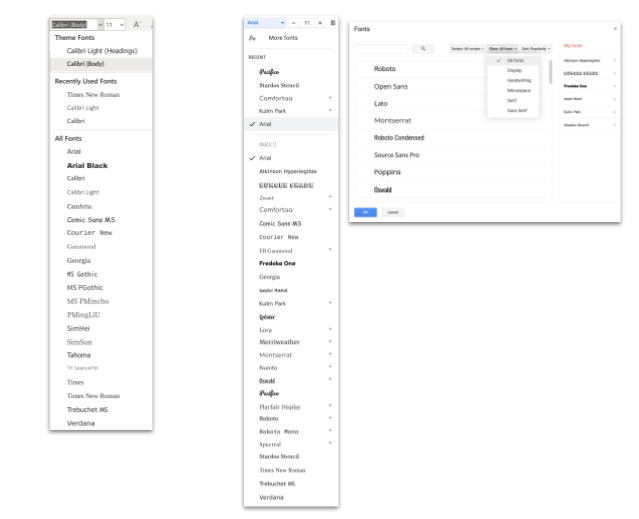
Choosing the More Fonts option opens a dialog that allows you to customise your font list. You can search by script type, style and popularity, and then selecting a font you like will add it to your permanent font list. You can add the fonts you like and remove the ones you don’t. I’m giving Google Docs the win on this one.
The other thing that seems like Google does better on is @mentions in comments. Unless I’m doing something wrong, I don’t seem to be able to get an @mention to work in a Word Online comment. In case you’re not sure what I mean, when leaving a comment in Google Docs, you can type an @ symbol followed a name or email address and that person will get an email notification to alert them to the fact that a comment as been left for them. You can even check a box to assign that comment to a person as an action item and they will be notified that they need to respond. Maybe I’m just missing something but I cannot seem to get Word Online to do the same thing, which frankly surprised me. If you know how I can get this to work, please drop a note in the comments. But based on what I can see, this is another clear win for Google Docs.
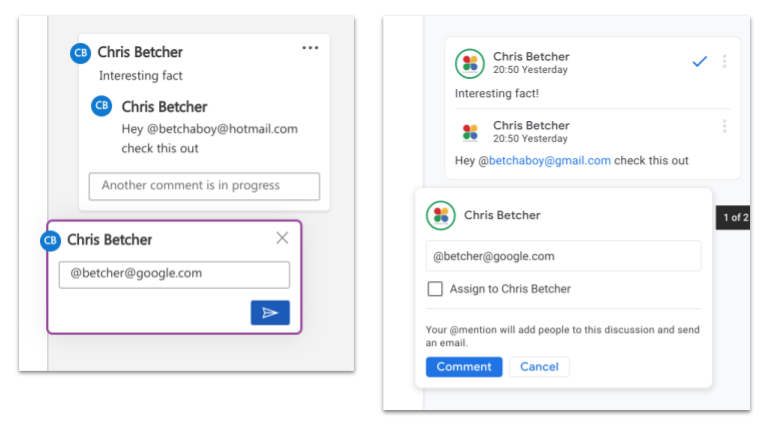
Word can still add comments to a document, I just can’t see how to include @mentions. On the positive side, I do kind of like how Word adds a little speech bubble icon in the right margin to indicate a comment is present, whereas Docs retains a dimmed yellow highlight on the selected text to indicate a comment is present. I think the Word approach is neater, but the Docs approach is probably more functional for easily seeing exactly what has been commented on. Clicking the speech bubble in Word re-highlights the text in gray, so you can see the selection, but I think the Google approach is more practical. Or maybe I’m just more used to it.
I’m genuinely trying not to appear as a Docs fanboy here, but things like customisable fonts and active commenting are important features that seen to be simply missing in Word Online. Maybe these features are present in the desktop version of Word, but again, as a Chromebook user that does not help me.
Let’s talk about voice typing. Both Word and Docs supports speech to text. Docs calls it Voice Typing and Word calls it Dictate. Both support a number of different languages and dialects. To test this, I selected a random book from my bookshelf (Start with Why by Simon Sinek, in case you’re curious), opened to a random page and read a random paragraph into both Word and Docs. Both did a good job and transcribed my voice accurately with no errors. Both allowed me to dictate punction like ‘full stop’, ‘comma’ and ‘new paragraph’ and in fact Word has an option to turn on Auto Punctuation, which seems to do a good job. Overall though, there’s not much to split the two when it comes to speech to text.
Let me give some kudos to Word for a bit. As an online word processor Word does ok, and in some regards does better than Docs. Let’s talk about some of the things that Word does really well.
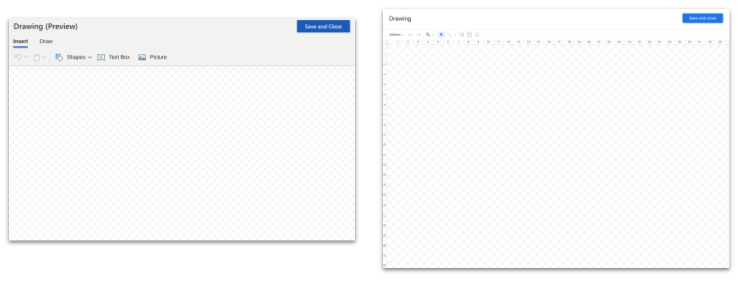
Word has better pen tools when inserting Drawing. Both Docs and Word can insert a Drawing into the document, and both do it in a very similar way. Select the Insert > Drawing option in either tool and a small canvas opens inviting you to use shapes and drawing tools to create a diagram or drawing, which then embeds into the page when you close the editor. The drawing editor for Word has two tabs, Insert and Draw, and the Draw tab has dedicated pen, highlight and eraser tools, making it easy to add annotations, especially if your device supports a stylus. That said, you can get the same result in Docs Drawings by selecting the Scribble option. It works, but it’s not as elegant as the pen tools in Word.
However, I do like the fact that Docs can also insert a pre-existing Drawing from my Drive as well as create one on the fly. That’s pretty handy. Overall though, both Drawing options are pretty equal.
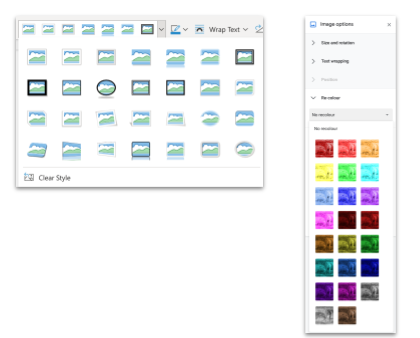
Another nice win for Word is the options it provides for frames around images. After inserting an image in Word you can select from a variety of different frames, shapes, effects, etc. I’m not sure how many of them I’d actually use though, and to be honest a lot of them feel a bit gimmicky, but if you like this sort of thing, well, Word can do it and Docs can’t. Both Word and Docs offer a range of options for controlling how text wraps with an image – inline, square, behind, in front – as well as rotation, size, cropping and aspect ratio lock. Docs does get a few points for it’s simple image editing tools, which allow you to adjust the transparency, brightness and contrast, as well as pick from some basic recolouring effects. They’re not amazing, but they sometimes come in handy. I can’t see anything similar in Word. I don’t use the effects in Docs often, and I doubt I’d use the frames in Word much, so it’s up to you what you think of these features.
Where Word does have a very useful feature that Docs does not, is the Immersive Reader. Teachers who use Word swear by the Immersive reader and I can understand why. For struggling readers, it can read the text aloud, identify grammatical parts of speech with colour coding, do translations and so on. It’s a useful tool, and a clear benefit for Word users.
Mind you, there is an Immersive Reader extension for Chrome, that looks exactly the same as the one in Word, and mostly works the same too. Unfortunately, it seems to not be able to read text in a Doc, only from webpages. However, if you want to be able to have text in a Doc read aloud by your Chromebook, just enable the Select to Speak function in the Accessibility Settings and the problem is solved. Just highlight any text anywhere on your Chromebook by holding the Search key as you draw a box around the text and it will be read aloud. It’s a great solution, built into ChromeOS, but I can’t take anything away from Immersive Reader. It’s a pretty useful addition to Word.
There are some brilliant Chrome Extensions that can also fill the gap of literacy support, such as Texthelp’s Read and Write, so if you want that kind of support for your students, it’s still available.
I’ve always been surprised that Docs cannot embed an online YouTube video directly into a page. I know technically it’s a word processor, which historically produces printed output, so I kind of understand that a video may not make sense in print, but come on Google… clearly many Docs never get printed and being able to embed video seems like a good idea. However, all is not lost. With the move to the underlying canvas technology in Docs you can now add a YouTube video as a link, which opens in a pop up player, so you can indeed watch a video from inside a Doc, although it’s not technically embedded into the page the same way it would be in a Google Slide for example. Word, on the other hand, can embed a video directly into the page, and also supports other platforms besides YouTube, such as Vimeo, Flipgrid, TED, etc. It’s kind of annoying that Google only support YouTube.
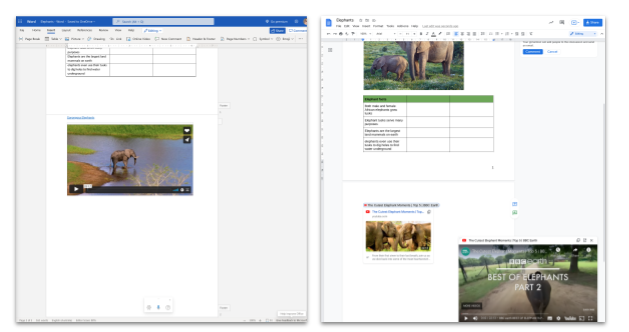
While the ability to embed a video seems like a good idea, I must admit that one big advantage of the non-embedded approach used by Google Docs is that the user can also scroll the page, edit text, etc, while watching the video in the player. This could be useful for asking students to watch a video while also referring to information in the Doc or even editing the Doc at the same time. Having the video embedded, as Word does, means you can’t actually scroll far without the video disappearing off the page, so the pop up player probably is the more functional choice.
Word also has a Resumé Assistant built in, powered by LinkedIn. Given that Microsoft owns LInkedIn, it’s no real surprise. I’m not sure how useful this feature is to you, but if it is, Word has it, Docs doesn’t.
There is a couple of other ‘wizard-y’ things that Word has, like the ‘Designer’ and the ‘Editor’. The Designer honestly feels like a gimmick to me, and I doubt I’d ever use it. It’s similar to the Explore tool in Google Slides, which helps you pretty up your Slides, and while it’s clever, I rarely use it. The Editor has some useful looking tools for assisting with writing such as an analysis tool for clarity, conciseness, formality, inclusiveness, etc, but these are part of the premium toolset and not available in the free version. The only non-paid functionality in the Editor is a spelling and grammar check, which Docs also has.
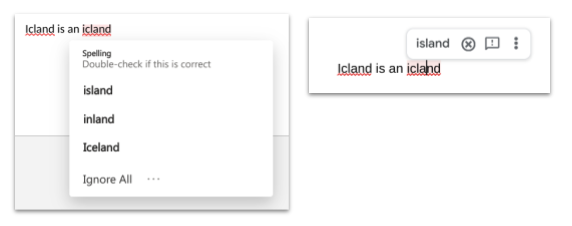
One of the tests I often use for a spellchecker is the phrase “icland is an icland”. Despite both words being spelled incorrectly, Google Docs is smart enough to know that the first word should be “Iceland” and the second “island”, to read “Iceland is an island”. The Docs spellcheck correctly identifies this mistake and offers to fix it correctly in both place. The Word spellcheck, while also suggesting the correct word, goes on to suggest other words that are not correct, such as “inland”. To my way of thinking, a spellcheck is most helpful when it just suggests the correct answer, not when it suggests a bunch of possibly correct, and some incorrect answers.
One of the really glaring omissions for Word Online is the lack of a built in dictionary. I find this really surprising for a word processor. Of course, Word for desktop has this feature, but not Word Online. Really strange. In Docs, you simply highlight a term from your writing and then choose Tools > Dictionary to see it pop up on the right side panel with the full dictionary definition. You can also type a search word directly into the dictionary of course. It’s a clear win for Google Docs here, as the dictionary is completely missing in Word Online.
Which brings me to a few things in Google Docs that I think are also clear wins. I’ve mentioned the fact that Google Docs now runs on an underlying technology called canvas. It allows for some AI smarts to be helpful for writers working in a Doc. For example, if you’re typing in a Doc and you type an @ symbol, Docs will pop up a list of options of people, places, events, other documents, etc, and invite you to add what it calls a “Smart Chip” to the page. Smart Chips are clickable links to these things – people, places, events, etc – that make the document more interactive and way more helpful. If you haven’t yet used them, just type @ in docs and see what happens. Give them a try, they are super helpful.
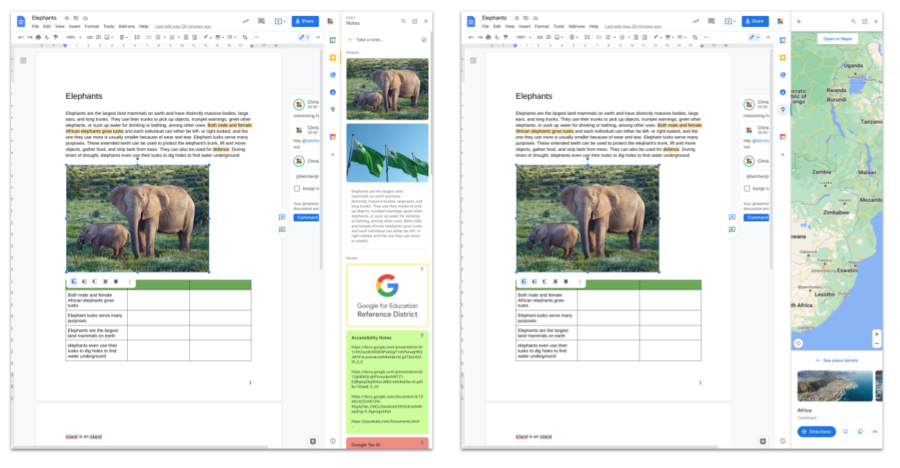
Speaking of helpful, the integration with Google Keep is brilliant in Docs. You can open Keep from the right side launcher and drag objects, images, text from Keep directly into your Doc. You can also right click on any text or image in your Doc and “Save to Keep” making it easy to collect ideas and reuse them as needed. This Keep integration is a hugely underrated feature of Docs, and if you haven’t tried it, do.
While not offering the same two way integration, the same side launcher panel also offers the ability to look at your ToDo list, your Contact List and even Google Maps, all while still in your document. I find these intergrations really handy. Unfortunately for Word users, nothing like this seems to exist in Word Online.
Another incredibly useful feature in Docs is the citation tool. Student can use this tool to collect metadata about books, journals, websites, etc that they might have used for their research, and the citation tool will then assemble it into a neat bibliography using APA, MLA or Chicago format. It also supports inline citations as well. While both Docs and Word support footnotes (and Word also has endnotes) the citation tool is a very special advantage that Docs users can make use of while Word users miss out.
I could keep going with additional comparisons, but the bottom line is this. Both Google Docs and Word Online have a great deal in common, and will easily do many of the essential word processing tasks you would expect. There are no really obvious flaws with either, and there should be nothing to prevent you from switching from one to the other – particularly people who have used Word for a long time and for whatever reason are being ‘forced’ to use Docs. I hear people say things like “Oh, but Docs can’t do this or that”, but the reality is, it probably can. In fact, Docs almost certainly does way more than you think it does!
My overall impression is that Google Docs has the edge in this comparison, and while that may be my bias or preference coming through, I think I could make a good argument for why I believe it’s the better choice. With the exception of one or two things that Word does well, Docs does everything else equally well, and in many cases better. I’ve avoided making judgements on the UI and UX (dropdown menus vs The Ribbon) or the number of clicks required to achieve a task, or the aesthetics of the design, or whether the dialog boxes seem logically laid out, because a lot of that is a matter of preference or personal taste.
If we were comparing Google Docs to the full desktop version of Word, it may be a different story. Obviously desktop Word has a huge feature set, full of impressively powerful features, some that are incredibly useful and some that are rarely used (or maybe never discovered). This is both the blessing and the curse of most full-featured software. Overall, I must admit I like the understated simplicity of Google Docs. It does a lot more than you might think because the designers have worked hard to keep it simple. And of course, desktop Word doesn’t run on a Chromebook, so again, it’s a moot point for millions of people around the world who, for whatever reason, choose ChromeOS as their operating system of choice.
Neither Google Docs nor Word Online do everything that desktop Word can do. And that’s ok. They don’t need to. They just need to to the majority of the things that the majority of people need done, and to do them well, fast and simply. The fact that they are both web-based, and not filled with more features and functions than most people need is, in my opinion, a positive thing for both. I do think Docs has a slight advantage in that regard because by not having a desktop version, Google has worked hard at bringing all the really important features to it, whereas Word Online can afford to miss a few things here and there because people always have the option of moving to desktop Word if they really need that other stuff. Unless you use a Chromebook of course, in which case Docs seems like a better option because it’s all in one place and not split across two different versions of the tool, one online and one desktop.
But look, at the end of the day, you should use whatever tool you prefer, and take advantage of whatever it gives you and deal with whatever it doesn’t. The fact that both products can do what they do in just a web browser, without actually being installed on your computer at all, is frankly astounding and the computer science equivalent of black magic.
As always, your feedback is welcomed in the comments. I’m very happy to hear your thoughts on where you might agree or disagree with me.
The thing I have NOT covered here – the really important thing – is how these two tools compare in a test of online collaboration. As online tools, the thing that makes them truly special is how well they allow people to share and collaborate in real time. How they allow people to simultaneously work together in the same document. This was always the strength of Google Docs and has been in Docs’ DNA from day one. Of course Microsoft has done a lot of catch up work to bring this same kind of collaboration into their tools now, so I would like to do a Part 2 of this review, after getting a group of people to help me hammer these two tools in a collaborative environment to see how they stack up.
More to come!